Visual Literacy & Art Direction: Speaking the Language of Design
Learn visual literacy for marketers: use hierarchy, contrast, and white space to give better design feedback, shape art direction, and apply GenAI prompts.

We've all been there: looking at a draft from a designer and knowing it isn't "right", but only being able to say "Can you make it pop?" Or "It feels too busy." Or the classic: "I'll know it when I see it."
These responses frustrate designers. More importantly, they produce no useful direction. The designer guesses, returns with something slightly different, and another revision round begins. The solution isn't to become a designer. It's to become design-literate, to learn enough of the visual vocabulary to translate your instincts into actionable direction. In this article, I will touch on how to speak the language of design. Because design isn't just decoration. It is the visual architecture of your empathy, the way your content either guides the Hero toward the solution or loses them in noise before they read a single word.
Why Visual Literacy Is a Marketing Skill, Not a Design Skill
Research shows it takes 50 milliseconds for a user to form an opinion about a visual, faster than a hook, faster than a headline. The visual experience is the first impression, and first impressions are made entirely without words. This means every marketer is responsible for visual outcomes. The minimum requirement: a working vocabulary of three principles: Hierarchy, Contrast, and White Space.
Principle 1: Hierarchy – The Narrative Map
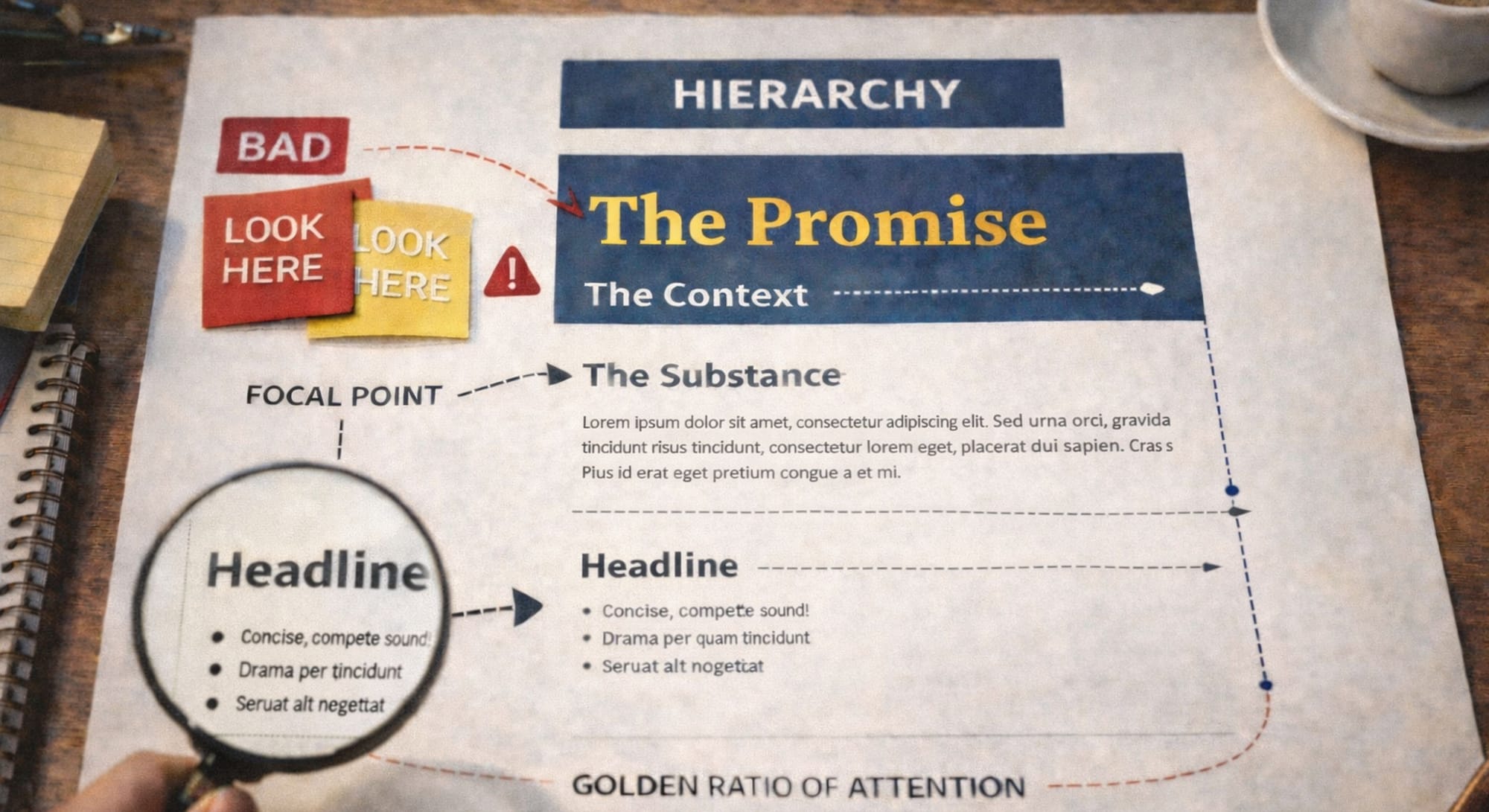
Hierarchy is the order in which a reader processes information. If the Hook is the Inciting Incident of the story, visual hierarchy determines the path the Hero takes through that narrative. Without it, the reader doesn't know where to look - so they look everywhere and absorb nothing.
The Focal Point. Every design needs one primary entry point. If everything is large and bold, nothing is the Hero. Two focal points pull the viewer in two directions simultaneously - and resolve in confusion.
The Golden Ratio of Attention. Use size, color, and weight to signal importance in layers: Headline (The Promise) → Subhead (The Context) → Body (The Substance). The brain processes information in layers of importance, not equal weight - your design should reflect that.
Without Hierarchy  | With Hierarchy  |
|---|---|
| Everything at the same visual weight — headline, body, CTA, logo all competing | Headline 3× larger than body; CTA isolated with contrast; logo subdued |
| Reader's eye bounces randomly; message doesn't register; CTA is missed | Reader moves through design in intended order; message lands; CTA converts |
Principle 2: Contrast – Creating the "Aha!" Moment
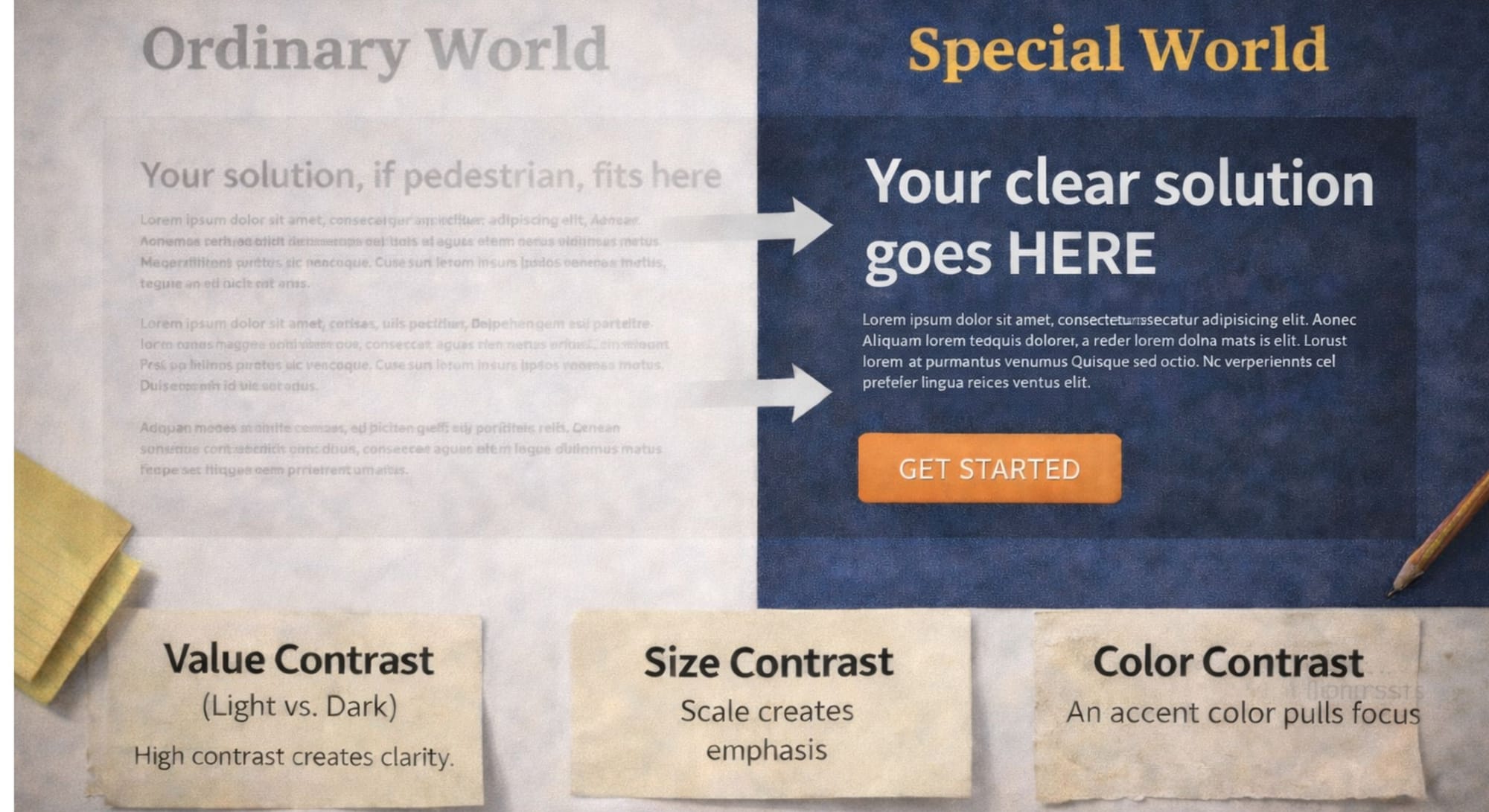
Contrast separates the Ordinary World of the scroll from the Special World of your solution. Without it, your message becomes invisible noise, technically present, but visually indistinguishable from everything around it. Contrast operates on three dimensions:
- Value Contrast (Light vs. Dark): High contrast creates authority and legibility. Low contrast signals uncertainty or simply becomes unreadable.
- Size Contrast: A massive headline paired with delicate body text creates a visual Curiosity Gap through scale alone, the tension pulls the eye downward.
- Color Contrast: A single accent color in a neutral design draws the eye immediately. This is why CTAs are almost always a contrasting color, the contrast signals "this is the action."
The Strategy: Use contrast to visually highlight the Pain Point versus the Transformation. The "before" state should feel heavy and constrained. The "after" state should feel open, light, and resolved.
Principle 3: White Space – The Breath of the Hero
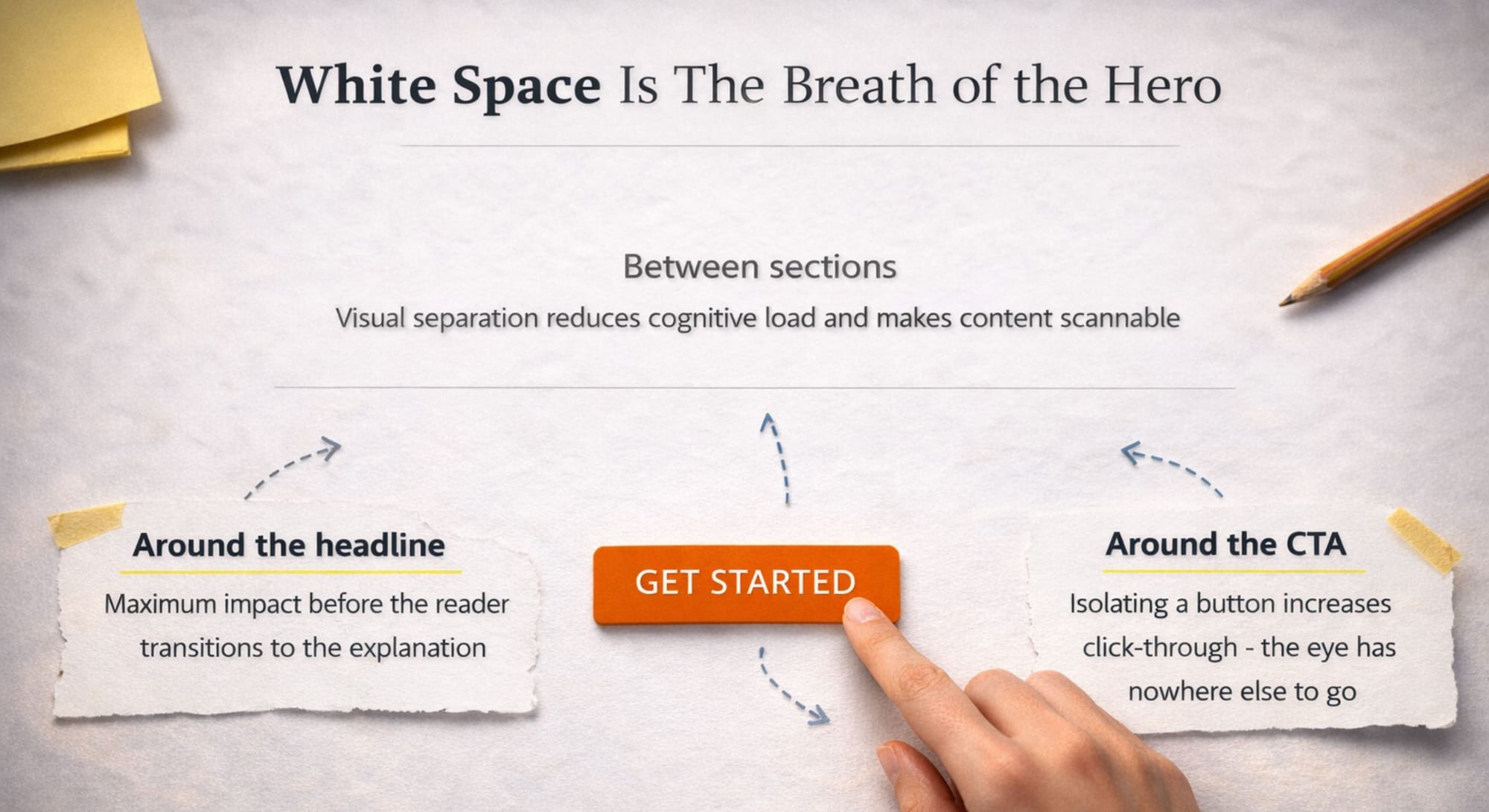
White space is not empty space. It is active space, the visual equivalent of the pause in a great speech. Without it, content becomes a wall. With it, content breathes. Marketers resist it because it feels "wasteful", but the more you add, the less any single element is noticed. White space makes your key message impossible to miss precisely because you've given it room to stand alone.
- Around the headline: Maximum impact before the reader transitions to the explanation.
- Around the CTA: Isolating a button increases click-through – the eye has nowhere else to go.
- Between sections: Visual separation reduces cognitive load and makes content scannable.
Reviewing Design with the Hero's Lenses
Effective art direction isn't about personal taste. It's about Narrative Governance – ensuring every visual decision serves the Hero's journey. Replace "I don't like it" with three structured questions:
1. Is the Hero the protagonist? Does imagery reflect the customer's journey, or the brand's trophies? A hero image of your office is brand-centric. A hero image of your customer winning is customer-centric.
2. Is the path clear? Can the Hero understand the core message within 2 seconds? Test it: look at the design for 2 seconds, then look away. What did you retain?
3. Does it validate the struggle? Does the visual mood match the empathy promised in the Hook? Misalignment between copy tone and design tone destroys trust before a word is read.
From Vague Feelings to Professional Feedback: A Vocabulary Upgrade
| Vague Feedback | Design-Literate Feedback |
|---|---|
| "Make it pop." | "Increase contrast between headline and background - try a darker background or heavier font weight." |
| "It feels too busy." | "Too many elements at the same visual weight. Reduce secondary copy size and increase white space around the CTA." |
| "I don't know where to look." | "No clear hierarchy - CTA and headline are the same size. Make the headline the dominant element." |
| "It looks cheap." | "Typography is inconsistent - too many font sizes competing. Limit to two typefaces and three sizes maximum." |
| "It doesn't feel like us." | "Color usage doesn't match our brand palette. Imagery is inconsistent with our visual tone. Refer to the brand manual." |
Visual Mistakes That Undermine Great Content
Mistake #1: Designing for the brand, not the Hero
The most common visual mistake is filling the design with brand assets – logo variations, award badges, product screenshots, office photos – instead of imagery that reflects the customer's reality. If the Hero can't see themselves in the visual, they disengage before reading the first word. Ask: does this image show the customer winning, or the brand boasting?
Mistake #2: Too many focal points
When everything is bold, highlighted, or oversized, nothing stands out. This happens when multiple stakeholders each insist their priority element must be prominent, resulting in a design where the headline, the subhead, the CTA, and the disclaimer all compete at the same visual weight. The fix: ruthlessly enforce one primary focal point per visual. Everything else serves it.
Mistake #3: Ignoring mobile hierarchy
A layout that works on desktop often collapses on mobile; stacked elements lose their hierarchy, white space disappears, and the CTA drops below the fold. Always review designs on a phone before approval. If the core message and the CTA aren't visible without scrolling on mobile, the hierarchy needs to be rebuilt for small screens first.
Mistake #4: Inconsistent typography
Using five different font sizes, three typefaces, and inconsistent weight combinations in one design signals visual chaos, and subconsciously communicates that the brand itself is disorganized. The rule: maximum two typefaces, three sizes, and two weights per asset. Anything beyond that creates noise, not emphasis.
Mistake #5: Mistaking decoration for communication
Adding visual elements – gradients, textures, icons, illustrations – because they "look nice" rather than because they serve the narrative is the design equivalent of filler content. Every visual element should either reinforce hierarchy, create contrast, or add emotional context. If it does none of these three things, remove it. White space is always better than decoration that doesn't communicate.
The Art Direction Checklist
- One clear focal point – one element the eye goes to first
- Headline is visually dominant over all other text elements
- CTA is isolated by white space and contrast – cannot be missed
- Hierarchy leads the eye: Promise → Context → Substance → Action
- High contrast between text and background (minimum 4.5:1 for accessibility)
- White space around key elements – nothing feels "trapped"
- Imagery reflects the Hero's journey, not the brand's trophies
- Visual tone matches the emotional promise made in the copy
- Design reads clearly at a 2-second glance on mobile
- No more than two typefaces and three font sizes used throughout
How to Use GenAI as Your Design Critic
GenAI can translate your vague feelings into structured, principle-based feedback - before you walk into the review meeting. Use this prompt:
You are a Senior Art Director and Brand Strategist with 20 years of experience directing visual content for B2B and B2C brands.
I am reviewing a design for [Project Name].
Goal: move the user from [Pain Point] to [Transformation].
Primary audience: [Persona Name / description].
Current issue: [Describe your vague feeling - e.g., "It feels too busy"].
Task:
1. Translate my feeling into 3 specific pieces of feedback using
Hierarchy, Contrast, and White Space.
2. For each, explain the cognitive reason it matters.
3. Keep all feedback Hero-Centric - reduce cognitive load, guide the
Hero through the intended narrative.
4. Suggest one question to ask the designer before the next revision.
Format: Number each piece. Keep each under 4 sentences.
Run this before every design review. The output gives you language, reasoning, and a conversation-starter, transforming your role from vague critic to precise co-architect.
Final Thought
When we speak the language of design, we stop being "critics" and start being Co-Architects. Visual literacy ensures that the beautiful substance we've built actually gets the spotlight it deserves.
Are your visuals helping the Hero find the way - or are they part of the noise?
Recommended Use Cases:
 Diana Socaciu